Simplify Compliance. Strengthen Security. Save Time.

Synoptic Cyber automates the RMF compliance journey from scans to fixes to documentation— So your team can focus on mission success, not manual process.

Why Choose

Synoptic Cyber?

Built from real-world DoD experience, Synoptic Cyber ensures cybersecurity compliance is faster, simpler, and more reliable-across every connected device.

An icon of an unlocked padlock with a blue and green keyhole, displayed on a dark circular background, representing the ability to automate STIG compliance.
Save Time

Minutes instead of hours per system

An icon of an unlocked padlock with a blue and green keyhole, displayed on a dark circular background, representing the ability to automate STIG compliance.
Strengthen Compliance

Fewer errors, full audit trails

An icon of an unlocked padlock with a blue and green keyhole, displayed on a dark circular background, representing the ability to automate STIG compliance.
All-in-One Platform

Scan, fix, document in one tool

An icon of an unlocked padlock with a blue and green keyhole, displayed on a dark circular background, representing the ability to automate STIG compliance.
Mission-Ready Results

Trusted by DoD and government contractors

Two people in business attire stand in a modern factory, looking at a laptop together. As they review data related to STIG and SCAP automation, sophisticated machinery and industrial equipment are visible in the background.

Efficient
STIG and SCAP Automation

Icon of a web browser window with a warning triangle containing an exclamation mark in the center, symbolizing an alert or error message related to STIG and SCAP automation.

The Problem

Manually scanning each system for vulnerabilities wastes critical time and increases the risk of missing key controls.

A white lightbulb icon with a blue checkmark inside it, set against a dark circular background with blue accent lines, symbolizes innovative solutions in STIG and SCAP automation.

The Solution

Synoptic Cyber ingests both STIGs and SCAP benchmarks and ensures that 100% of the controls are verified to compliance.

Outlined hand icon with three teal plus signs above it, all set against a dark circular background, symbolizing support for STIG and SCAP automation.

Benefits

A cybersecurity scan management dashboard, featuring STIG and SCAP automation, shows scan status, device names, templates, completion status, scan date, and file size, with options to download reports or create new scans.
Two overlapping rounded squares outlined in a blue-to-green gradient, each divided diagonally by a line, on a light gray background—symbolizing streamlined processes such as STIG and SCAP automation.

Automated
(Fix Non-Compliant Items Instantly)

Icon of a web browser window with a warning triangle containing an exclamation mark in the center, symbolizing an alert or error message related to STIG and SCAP automation.

The Problem

Fixing vulnerabilities manually is slow and inconsistent, especially across complex environments.

A white lightbulb icon with a blue checkmark inside it, set against a dark circular background with blue accent lines, symbolizes innovative solutions in STIG and SCAP automation.

The Solution

Our system automatically remediates failed controls according to your approved benchmarks saving time and ensuring consistency.

Outlined hand icon with three teal plus signs above it, all set against a dark circular background, symbolizing support for STIG and SCAP automation.

Benefits

A cybersecurity scan request dashboard displays device info, scan status, risk scores, remediation steps, and final scan results—incorporating STIG and SCAP automation throughout the process—with sections for initial and final risk, as well as a navigation menu on the left.
Two overlapping rounded squares outlined in a blue-to-green gradient, each divided diagonally by a line, on a light gray background—symbolizing streamlined processes such as STIG and SCAP automation.

Integrated
Checklist Editor

Icon of a web browser window with a warning triangle containing an exclamation mark in the center, symbolizing an alert or error message related to STIG and SCAP automation.

The Problem

Utilizing multiple tools and file formats is burdensome, and slows down workflow.
A white lightbulb icon with a blue checkmark inside it, set against a dark circular background with blue accent lines, symbolizes innovative solutions in STIG and SCAP automation.

The Solution

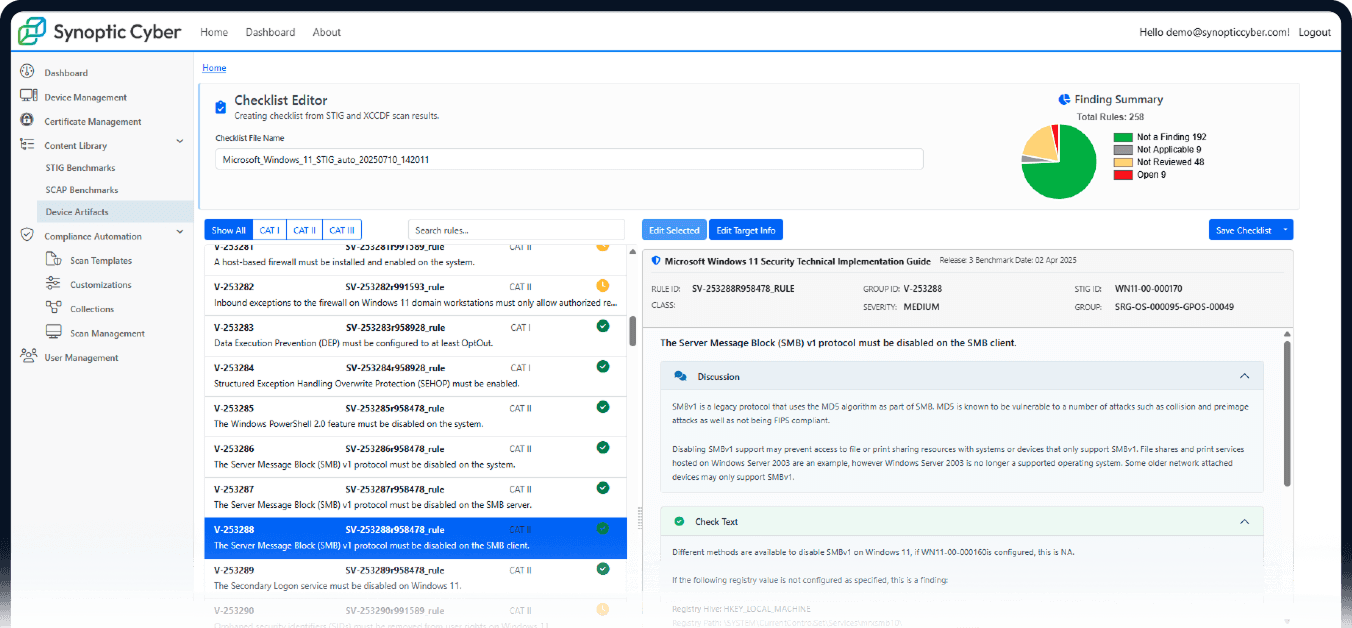
Use Synoptic Cyber’s built-in checklist editor to review, adjust, and comment on STIGs within the platform- no extra tools needed.
Outlined hand icon with three teal plus signs above it, all set against a dark circular background, symbolizing support for STIG and SCAP automation.

Benefits

A cybersecurity dashboard shows a checklist editor for Microsoft Windows STIG rules, a pie chart summary, and remediation steps powered by STIG and SCAP automation. The interface includes rule details, status icons, tabs, and navigation menus on the left.
Two overlapping rounded squares outlined in a blue-to-green gradient, each divided diagonally by a line, on a light gray background—symbolizing streamlined processes such as STIG and SCAP automation.

Device Management Across Windows, Linux, Embedded Devices

Icon of a web browser window with a warning triangle containing an exclamation mark in the center, symbolizing an alert or error message related to STIG and SCAP automation.

The Problem

Different operating systems and device types require juggling multiple compliance tools.

A white lightbulb icon with a blue checkmark inside it, set against a dark circular background with blue accent lines, symbolizes innovative solutions in STIG and SCAP automation.

The Solution

Synoptic Cyber managers scans and fixes across all supported platforms in one place, including Windows, Linux, software apps, and embedded devices.

Outlined hand icon with three teal plus signs above it, all set against a dark circular background, symbolizing support for STIG and SCAP automation.

Benefits

A web dashboard shows a device management table listing device names, models, statuses, groups, last sync dates, and serial numbers—with integrated STIG and SCAP automation—alongside filters and management options on the left sidebar.
Two overlapping rounded squares outlined in a blue-to-green gradient, each divided diagonally by a line, on a light gray background—symbolizing streamlined processes such as STIG and SCAP automation.

System Security
Plan (SSP) & Artifact Generation

Icon of a web browser window with a warning triangle containing an exclamation mark in the center, symbolizing an alert or error message related to STIG and SCAP automation.

The Problem

Manually compiling SSPs and compliance artifacts is tedious and risks missed components.

A white lightbulb icon with a blue checkmark inside it, set against a dark circular background with blue accent lines, symbolizes innovative solutions in STIG and SCAP automation.

The Solution

Synoptic Cyber automatically compiles clean, audit-ready documentation – including Enclosure 14, PPSM, and all required artifacts.

Outlined hand icon with three teal plus signs above it, all set against a dark circular background, symbolizing support for STIG and SCAP automation.

Benefits

Screenshot of the Synoptic Cyber STIG Benchmark Library page, displaying a list of cybersecurity benchmarks with options to view, edit, delete, or download files. The interface highlights seamless STIG and SCAP automation capabilities, with a sidebar menu visible on the left for easy navigation.
Two overlapping rounded squares outlined in a blue-to-green gradient, each divided diagonally by a line, on a light gray background—symbolizing streamlined processes such as STIG and SCAP automation.

Certificate Management Tool (Add-On Feature)

Icon of a web browser window with a warning triangle containing an exclamation mark in the center, symbolizing an alert or error message related to STIG and SCAP automation.

The Problem

Applying local security certificates to embedded systems is tricky and time-consuming.

A white lightbulb icon with a blue checkmark inside it, set against a dark circular background with blue accent lines, symbolizes innovative solutions in STIG and SCAP automation.

The Solution

Our Certificate Management tool integrates with on-premises certificate authorities and automates the generation and application of certificates to embedded systems.

Outlined hand icon with three teal plus signs above it, all set against a dark circular background, symbolizing support for STIG and SCAP automation.

Benefits

A certificate management dashboard displays device info in a table, including name, model, IP address, processing status, and certificate state. Color-coded labels show certificate stages. The sidebar menu is on the left. The dashboard also supports STIG and SCAP automation for streamlined compliance monitoring and reporting.
Two overlapping rounded squares outlined in a blue-to-green gradient, each divided diagonally by a line, on a light gray background—symbolizing streamlined processes such as STIG and SCAP automation.

Frequently Asked Questions (FAQs)

Find answers to your questions about our compliance platform and its features.

check What is Synoptic Cyber?

Synoptic Cyber is an all-in-one compliance platform designed to automate the RMF process. It supports NIST STIG and SCAP guidelines, ensuring your government systems remain compliant. Our platform streamlines scanning, remediation, and documentation in one workflow.

The platform scans your systems for compliance issues and identifies and performs necessary remediations. Integrated tools allow you to generate and compile technical artifacts.

Yes, Synoptic Cyber is designed with user experience in mind. Its intuitive interface allows users to navigate easily and efficiently. You can manage compliance tasks without extensive training.

We offer comprehensive support through various channels, including email and ticketing systems Our team is dedicated to helping you resolve any issues quickly. Additionally, we provide resources and documentation to assist you.

Absolutely! Synoptic Cyber utilizes STIG and SCAP standards to ensure that results are usable internally and for external tools.

The primary benefits include time savings, improved compliance accuracy, and enhanced audit readiness. By automating the RMF process, you can focus on other critical tasks. Our platform also reduces the risk of human error.
While no extensive training is required, we do offer onboarding sessions. These sessions help users familiarize themselves with the platform’s features. Our goal is to ensure you get the most out of Synoptic Cyber.
Our platform is continuously updated to comply with the latest regulations. This ensures that you are always using the most current compliance standards. You can trust Synoptic Cyber to keep your systems secure.
Unfortunately, we do not offer free trials. However, we can arrange a demo for you. We avoid trials because each customer’s installation is tailored to their needs.
check What are the benefits?
The primary benefits include time savings, improved compliance accuracy, and enhanced audit readiness. By automating the RMF process, you can focus on other critical tasks. Our platform also reduces the risk of human error.
While no extensive training is required, we do offer onboarding sessions. These sessions help users familiarize themselves with the platform’s features. Our goal is to ensure you get the most out of Synoptic Cyber.
Our platform is continuously updated to comply with the latest regulations. This ensures that you are always using the most current compliance standards. You can trust Synoptic Cyber to keep your systems secure.
Unfortunately, we do not offer free trials. However, we can arrange a demo for you. We avoid trials because each customer’s installation is tailored to their needs.

heavy lifting

Ready to simplify your compliance process?

See how Synoptic Cyber automates the heavy lifting—so your team can move faster, stay compliant, and focus on mission success.